Live preview without saving in Nuxt and Next.js, and how it works
Show editors the real page next to the form, updated as they type, before saving. Setup in Nuxt and Next.js, then the postMessage mechanics.
An editor changes a headline and wants to see how it wraps on the real page. In most setups that means saving a draft, opening the preview URL in another tab and reloading. Do that twenty times and the version history fills with twenty versions nobody wanted.
I wanted editors to see the real page next to the form, updated as they type, with nothing saved. This post shows how to set that up in a Nuxt page and a Next.js page with Easy CMS, the embedded CMS I introduced in the first post in this series. The second half explains how it works: an iframe, postMessage, a handshake and a signed token. That part applies to any CMS or framework.
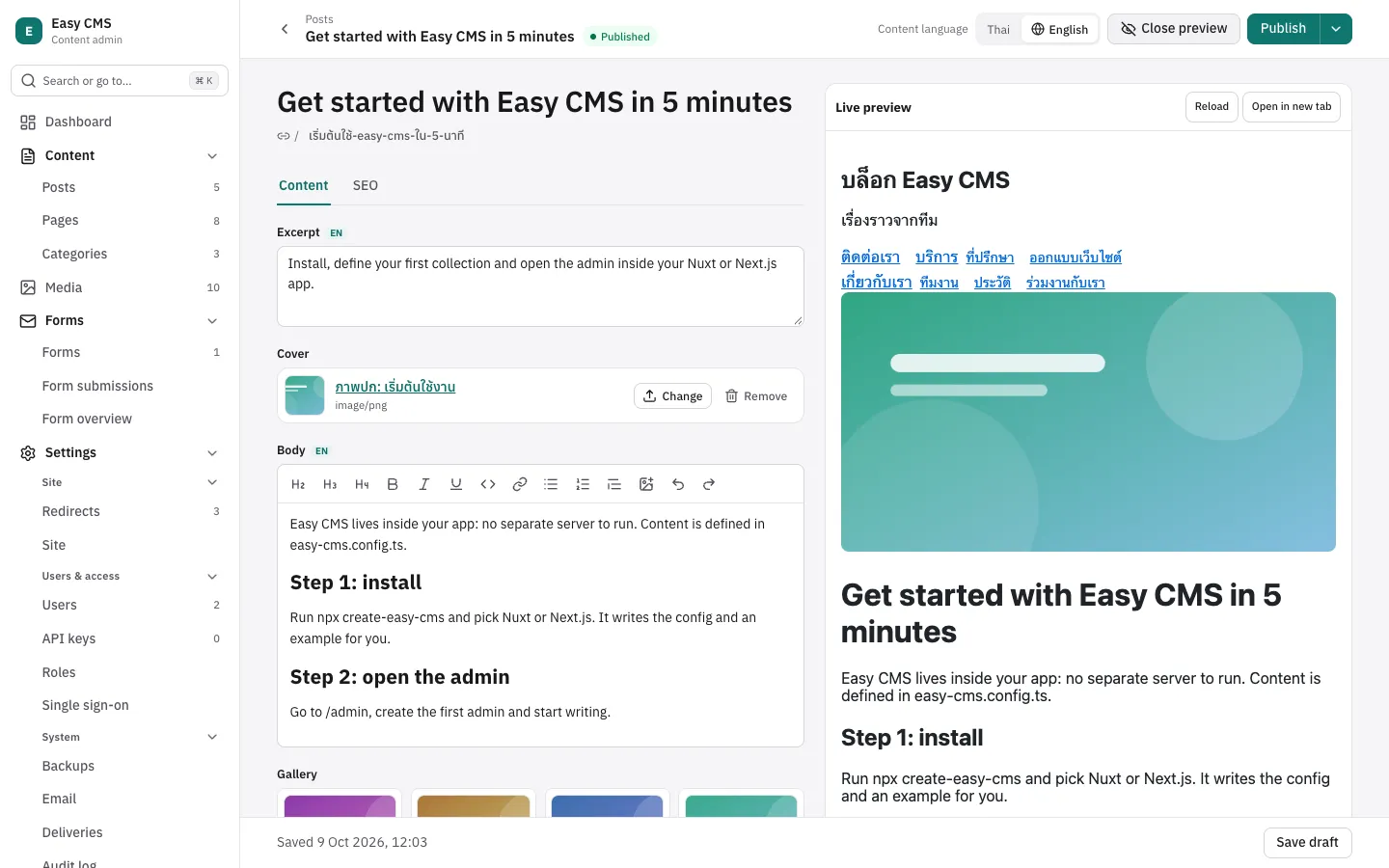
Step 1: tell the CMS where a document lives
Add a preview function to the collection. It returns the page that shows the document: a path on your site, an absolute URL, or null when there's no page yet.
// easy-cms.config.ts (inside defineConfig)
{
  slug: 'posts',
  drafts: true,
  // Live preview in the admin: the page that shows a post.
  preview: ({ doc }) => (doc.slug ? `/posts/${doc.slug}` : null),
  fields: [/* … */],
}
The function runs on the server. A function can't be sent to the browser, so the admin only learns that the collection has a preview and asks the server for the URL. The admin then shows a Preview button, and the page opens in a frame beside the form. Globals take the same option.
Step 2: a Nuxt page
The page must be able to read drafts, or the preview shows a 404 for a post that was never published. In the Nuxt example, the server route passes the logged-in user to the Local API and includes drafts only for them:
// server/api/posts/[slug].get.ts
export default defineEventHandler(async (event) => {
  const cms = await useEasyCMS()
  const user = await useEasyCMSUser(event)
  const { docs } = await cms.find('posts', {
    where: { slug: { equals: getRouterParam(event, 'slug') } },
    limit: 1,
    overrideAccess: false,
    user,
    draft: user !== null,
  })
  const post = docs[0]
  if (!post) throw createError({ statusCode: 404, statusMessage: 'Post not found' })
  return post
})
The page hands its data ref to useLivePreview, which the Nuxt module auto-imports:
<script setup lang="ts">
import { renderRichText } from '@easy-cms/richtext'

const route = useRoute()
const { data: post } = await useFetch(`/api/posts/${route.params.slug}`, {
  headers: useRequestHeaders(['cookie']),
})
useLivePreview(post)
const html = computed(() => renderRichText(post.value?.body))
</script>

<template>
  <article v-if="post">
    <p v-if="post.status === 'draft'"><strong>Draft preview</strong></p>
    <h1>{{ post.title }}</h1>
    <div class="body" v-html="html" />
  </article>
</template>
Two details matter here:
useRequestHeaders(['cookie'])forwards the editor's session cookie during server rendering. Without it, the server-sideuseFetchruns as an anonymous visitor and can't see the draft.The rich text is rendered in a
computed, so it re-renders whenpostchanges.renderRichTextworks in the browser too, and it escapes text and drops unsafe URLs, which is whyv-htmlis acceptable here.
Outside the admin's frame, useLivePreview does nothing, so the same page serves real visitors.
Step 3: a Next.js page
In Next.js you load the post in a Server Component and render it in a Client Component. The loading side mirrors the Nuxt route:
// app/posts/[slug]/page.tsx
import { getEasyCMS, getEasyCMSUser } from '@easy-cms/next'
import { notFound } from 'next/navigation'
import config from '@/easy-cms.config'
import { PostView } from './post-view'

export const dynamic = 'force-dynamic'

export default async function PostPage({ params }: { params: Promise<{ slug: string }> }) {
  const { slug } = await params
  const cms = await getEasyCMS(config)
  const user = await getEasyCMSUser(config)
  const { docs } = await cms.find('posts', {
    where: { slug: { equals: decodeURIComponent(slug) } },
    limit: 1,
    overrideAccess: false,
    user,
    draft: user !== null,
  })
  if (!docs[0]) notFound()
  return <PostView post={docs[0]} />
}
The rendering side takes the server's document as its initial value:
// app/posts/[slug]/post-view.tsx
'use client'

import { useLivePreview } from '@easy-cms/next/live-preview'
import { type RichTextInput, renderRichText } from '@easy-cms/richtext'

interface Post {
  title: string
  status?: string
  body?: RichTextInput | null
}

export function PostView({ post: initial }: { post: Post }) {
  const post = useLivePreview(initial)
  return (
    <article>
      {post.status === 'draft' ? <p><strong>Draft preview</strong></p> : null}
      <h1>{post.title}</h1>
      <div className="body" dangerouslySetInnerHTML={{ __html: renderRichText(post.body) }} />
    </article>
  )
}
@easy-cms/next/live-preview is built as its own file with 'use client' at the top, separate from the server-side @easy-cms/next entry, so Next.js treats it as a Client Component module. When the Server Component passes a new initial (after a router refresh, say), the hook switches to it.
Any other frontend
The framework helpers wrap one function from @easy-cms/core/live-preview, which has no Node.js imports:
import { subscribeLivePreview } from '@easy-cms/core/live-preview'

const stop = subscribeLivePreview((doc) => render(doc), {
  origin: 'https://cms.example.com', // the admin's origin; default: the page's own
})
With the Nuxt and Next.js adapters, the admin and the site share an origin, so the default is right. With a standalone CMS server on another origin, set origin.
How it works
Here's what happens when an editor opens the preview and types:
admin (form)                 server                       iframe (your page)
     │ POST /posts/3/preview      │                                │
     │ {form values} ───────────► │ merge with current draft,      │
     │                            │ read path: populate,           │
     │ ◄──── { doc, url+token } ──│ afterRead, field access        │
     │ set iframe src (once) ─────────────────────────────────────►│ loads, subscribes
     │ ◄──────────────────────────────────── { type: 'easy-cms:preview-ready' }
     │ postMessage({ type: 'easy-cms:preview', doc }, pageOrigin) ─►│ render(doc)
     │ … each change, 300 ms later: POST again, postMessage again …│
The page loads once
The admin sets the iframe's src only the first time. After that, every change arrives as a message, so typing never reloads the page, and scroll position and client state survive. The only time it loads the page again on its own is when the editor switches the content language, because each language can have its own URL.
Debounce and stale responses
The admin watches the form deeply and waits 300 ms after the last change before it asks the server. Requests can still overlap on a slow connection, so each one gets a number, and a response is dropped if a newer request has started since. Without that, a slow early response could arrive last and show text the editor already deleted.
The ready handshake
The admin has the first document before the page in the iframe has finished loading. A message posted to a frame that is still loading, with no listener yet, is simply lost. So the page announces itself: subscribeLivePreview adds its listener and then posts { type: 'easy-cms:preview-ready' } to the parent. When the admin receives that from its own frame, it sends the latest document again.
The ready ping goes to any origin ('*') because it carries no data. The document goes the other way with a specific targetOrigin, the origin of the preview URL, so it's never delivered to a page that navigated elsewhere. The page checks event.origin against the admin's origin before it renders anything.
The same output path as a normal read
The form doesn't send its raw values to the page. The server builds the document first:
It loads the saved document and its pending draft, then merges the form values on top. A partial form previews correctly.
It converts the values the way a save would, but skips
requiredand keeps values that fail validation. Half-typed content still previews.It runs the result through the same
output()function as every read: relationships and uploads populated (the admin asks fordepth=2),afterReadhooks applied, and fields the editor may not read removed.
Nothing is written. The page receives a document with the same shape as the one it loaded on the server, so one render function covers both. Only users who may update the document (or create one, for a new document) can preview it.
Preview tokens for sites on another origin
Same-origin pages can read the draft with the editor's session cookie, as in steps 2 and 3. A frontend on another origin has no session. So the admin adds easy-cms-preview=<token> to the preview URL, and the page passes it on as ?preview= when it fetches GET /api/cms/posts/:id.
The token is <payload>.<signature>. The payload is base64url JSON with the collection, the id, an expiry and, for tokens from the admin, the user who opened the preview. The signature is an HMAC-SHA256 of preview: plus the payload, keyed with the CMS secret; the prefix keeps it distinct from the session and password signatures made with the same secret. The server refuses a token that is tampered with or expired, or that names a different document. A token from the admin reads with that user's access and stops working if the user is deactivated. The default lifetime is one hour.
I scoped each token to one document on purpose. A token that unlocked all drafts would be simpler, but a leaked preview link would then expose everything unpublished. With this design, a leaked link exposes one document for up to an hour. On the server, cms.createPreviewToken({ collection, id }, { user }) makes one, for a "share preview link" button, for example. Without user, the token reads with full access.
CSP: frame-src on the admin, and your own headers
The admin sends a Content Security Policy, and a page can't be framed unless frame-src allows it. The admin allows frame-src 'self' http: https: so that a standalone admin can show a site on another origin. It keeps frame-ancestors 'none' and X-Frame-Options: DENY for itself, so nobody can frame the admin.
The other half is up to you. If your site sends X-Frame-Options: DENY or frame-ancestors 'none', the browser refuses to show it in any frame, including the preview, and the pane stays blank. Allow 'self' for a same-origin admin, or the admin's origin for a standalone one.
Trade-offs
The page must render from data. If you render rich text to HTML on the server and only send HTML to the client, live preview can't update it. You have to render on the client too.
Render defensively. The example pages check that a relationship is an object with a
urlbefore showing it, so the page doesn't break if an id arrives where a populated document is expected.Treat preview URLs as share links. Anyone holding one can read that draft until it expires.
It's a preview, not a page editor. Editors type in the form and watch the page. They can't click a heading on the page to edit it.
[TODO: your story — one line on what an editor said or did the first time they used live preview, if it happened]
The pattern behind it (load the frame once, debounce, a ready handshake, an explicit targetOrigin, and a preview built through the normal read path) works without Easy CMS. If you build your own, the handshake and the stale-response check are the two parts I'd keep.
The full examples are in examples/nuxt-blog and examples/next-blog, and the guide is at Live preview.
Easy CMS is MIT-licensed: github.com/maritonx/easy-cms · docs. If you try it, tell me what got in your way in the feedback issue.