A calendar in a CMS admin: time zones without a plugin, drafts, and a keyboard way to drag
How I added a content calendar to an embedded Node.js CMS: FullCalendar 6, every date in the site's time zone with no plugin, dragging that respects drafts, Undo, and a keyboard alternative to dragging.
An editor at a news site asked me a simple question: "What goes out this week?" The admin of Easy CMS, the CMS that runs inside your Nuxt or Next.js app, could not answer it. Lists sort by date, but a sorted list doesn't show that Thursday is empty and Friday has four launches at 09:00.
So I added a calendar: a mode of every collection list that has dates, a Calendar page in the menu that shows the whole site, and dragging to reschedule. This post covers the four decisions that took the most thought: which library, how to show dates in the site's time zone without a plugin, what a drag should do to a document that has an unpublished draft, and how to make dragging work without a mouse.
Turning it on
A collection names its date fields:
{
  slug: 'events',
  admin: {
    calendar: { start: 'startsAt', end: 'endsAt', color: 'category' },
  },
  fields: [/* … */],
}
end and color are optional. color is a select or relationship field, and each of its values gets a colour. The CMS checks the names when it starts: start and end must be top-level date fields, and color can't be a hasMany field. I don't guess from field names. A collection without admin.calendar has no calendar, because a createdAt calendar is noise.
The list then gets a List | Calendar switch with month, week, day and agenda views. The view and the day are in the URL (?calendar=week&date=2026-10-26), so a link opens the same calendar. The list's filters apply too, so "workshops in November" is a filter plus a month.
Picking a library: FullCalendar 6, not 7
I didn't want to write a calendar grid. Week views with overlapping events, drag handles and a "+3 more" overflow are a project of their own. FullCalendar's MIT plugins cover month, week, day and list views and dragging.
FullCalendar 7 came out a few weeks earlier. It moves the plugins into a headless package and needs a Temporal polyfill. That is a larger change than I wanted while the API settles, so I stayed on 6.
Before building on it, I spent an hour on a throwaway page to check three things:
Thai. The
thlocale gives Thai month names and Buddhist years ("ตุลาคม 2569"). It starts the week on Monday, which Thai calendars don't do, so I setfirstDay: 0for Thai.Keyboard. The buttons, the day numbers and the events are focusable, and Enter opens an event. You can't drag with the keyboard, and you can't select an empty slot. More on that below.
Screen readers. The grid has
role="grid", but a day number reads as "28", not the date. FullCalendar'snavLinkHintandeventHintoptions produce atitle, not an accessible name.
The fix for the last point is two hooks:
dayCellDidMount: (arg) => {
  const link = arg.el.querySelector('.fc-daygrid-day-number')
  link?.setAttribute('aria-label', fullDate(arg.date)) // "Thursday, 15 October 2026"
  link?.setAttribute('role', 'button') // it picks the day; an <a> without href is no link
},
eventDidMount: (arg) => {
  arg.el.setAttribute('aria-label', `${arg.event.title}, ${fullDate(arg.event.start, true)}`)
},
The role line came from a failing end-to-end test, not from reading docs. Playwright's getByRole('link', { name: 'Wednesday, 15 May 2030' }) found nothing. FullCalendar renders day numbers as <a> without href, and an anchor without href has no role, so screen readers don't announce it as clickable.
The calendar is about 270 KB of JavaScript (80 KB compressed). It loads with defineAsyncComponent the first time someone opens a calendar, so editors who never do don't download it.
Time zones without a plugin
The site's time zone is set once in the config (timeZone: 'Asia/Bangkok'). An editor in London who schedules a post for 09:00 means 09:00 in Bangkok. If every browser showed its own zone, two editors would see different times for the same publish.
FullCalendar handles named time zones only through a plugin (Luxon or Moment). Without one, it understands local and UTC. I didn't want a date library just for this.
The trick: tell FullCalendar its zone is UTC, and hand it the site's wall-clock times. 08:00 on 30 October in Bangkok goes in as 2026-10-30T08:00, and FullCalendar draws it at 08:00 on the 30th. When something comes back from FullCalendar (a drop, a selected slot), turn the wall-clock time into the real moment.
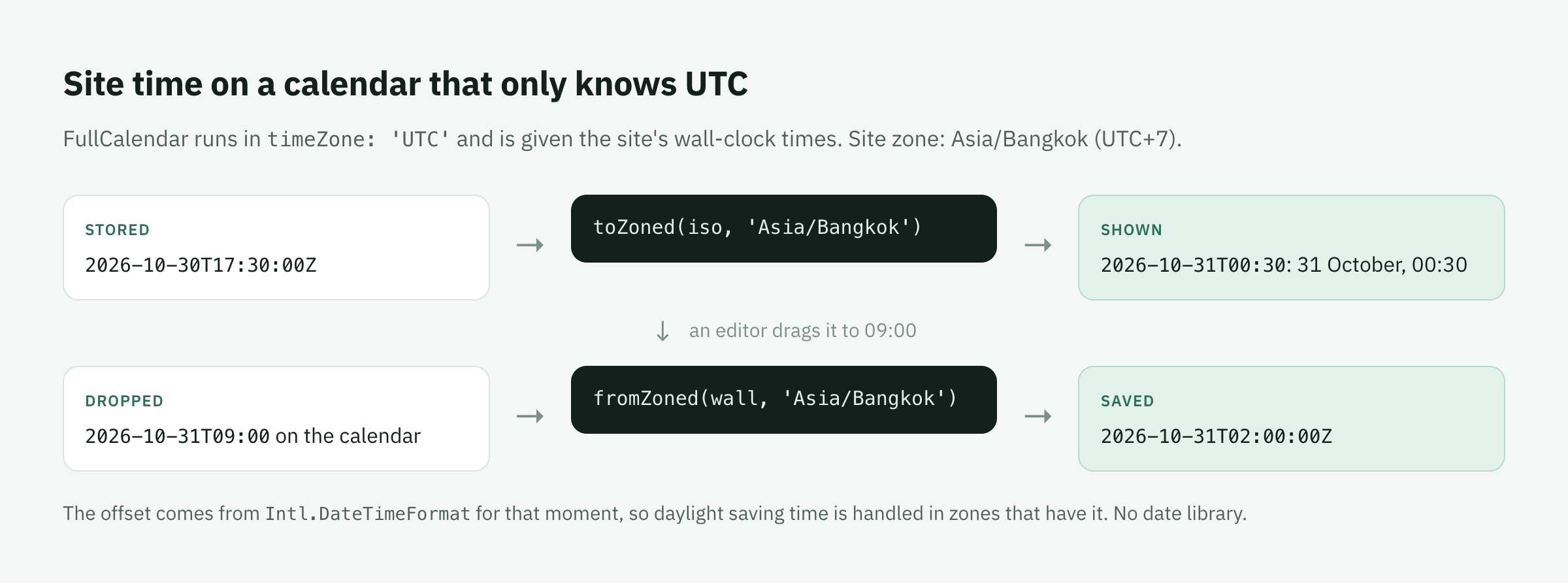
Both directions need one thing: how far a zone is ahead of UTC at a given moment. Intl.DateTimeFormat knows that for every IANA zone:
/** Minutes `timeZone` is ahead of UTC at `ms`. */
function offsetAt(ms: number, timeZone: string): number {
  const parts = new Intl.DateTimeFormat('en-US', {
    timeZone, hourCycle: 'h23',
    year: 'numeric', month: '2-digit', day: '2-digit',
    hour: '2-digit', minute: '2-digit', second: '2-digit',
  }).formatToParts(new Date(ms))
  const get = (type: string) => Number(parts.find((p) => p.type === type)?.value)
  const asUTC = Date.UTC(get('year'), get('month') - 1, get('day'), get('hour'), get('minute'), get('second'))
  return Math.round((asUTC - Math.floor(ms / 1000) * 1000) / 60_000)
}

/** A moment → `YYYY-MM-DDTHH:mm` on the zone's clock. */
const toZoned = (iso: string, timeZone: string) => {
  const ms = Date.parse(iso)
  return new Date(ms + offsetAt(ms, timeZone) * 60_000).toISOString().slice(0, 16)
}

/** `YYYY-MM-DDTHH:mm` on the zone's clock → the moment. */
function fromZoned(local: string, timeZone: string): string {
  const wall = Date.parse(`${local}:00Z`)
  let ms = wall - offsetAt(wall, timeZone) * 60_000
  // Across a change of daylight saving time, once more with the offset at that moment.
  ms = wall - offsetAt(ms, timeZone) * 60_000
  return new Date(ms).toISOString()
}
The second pass in fromZoned matters for zones with daylight saving time. The offset at the wall-clock instant read as UTC can differ from the offset at the real moment. A unit test pins it with New York at the start of November.
Two more details. FullCalendar's "today" and its red now-line use now, which would be UTC midnight, so I pass now: () => toZoned(new Date().toISOString(), zone). And the same two functions now power every date input in the admin, not only the calendar. Someone whose browser is in another zone sees "Time zone: Indochina Time (GMT+7)" next to date inputs. People in the site's own zone don't see the extra line.
Loading a range
The calendar asks the REST API for documents that overlap the visible range. They start before its end, and end (or, without an end, start) after its beginning:
{ and: [
  { startsAt: { lt: to } },
  { or: [{ endsAt: { gte: from } }, { startsAt: { gte: from } }] },
] }
The list's filters are and-ed in. The API returns at most 100 documents per request, so the calendar loads the first page, then the rest at once, up to 500. Past that it says "More than 500 here: filter to see the rest". A month with more than 500 entries is unreadable anyway.
One gotcha came up in testing. With drafts and versions, ?draft=true matches the filter on the live document and then returns its pending draft. Move a published post's date in a draft, and the range query finds it by its old date while the document says the new one. The calendar now drops documents whose shown dates fall outside the range. Fixing the query itself is issue #300.
What a drag should do to a draft
Dragging an event is a save. The question is which save.
Easy CMS keeps drafts of published documents separately. Edits go to a pending draft, and the site keeps showing the published version until someone publishes. The Local API also has a live option that edits the published document directly, so a drag could have used it.
I decided against that. A team that turned drafts on wants every change to go through publishing. A calendar drag that skips that step is a shortcut nobody asked for. So a drag saves exactly like Save on the edit page. If there is a pending draft, the date moves in the draft, and the message says so: "Moved in the draft: the site changes when it is published."
Telling the two cases apart took one more request. The calendar reads drafts, so a document with a pending draft looks like a draft. After a save returns a draft, I ask for the live version:
const saved = await api('PATCH', `${path}?depth=0`, body)
if (saved.status !== 'draft') return false
// A pending draft of a live document, or a document never published?
const live = await api('GET', `${path}?depth=0`).catch(() => null)
return live?.status === 'published'
Scheduled publishes show on the Calendar page too, outlined in dashes. Dragging one schedules it again for the new time, which replaces the pending job. That needs the publish permission, not just update.
Every move shows a message with Undo for 8 seconds. Undo is a second save with the old values. If the server refuses a save, for example a validation rule or an access rule, the event jumps back with the server's reason.
Dragging without a mouse
WCAG 2.2 asks that anything you can drag can also be done with a single pointer and a keyboard. FullCalendar can't drag from the keyboard, so the calendar has a side column with the picked day's documents. Clicking a day, or pressing Enter on its number, picks it. Each item there has a Move to… button that opens a date and time field. The duration is kept.
The same column fixed the other gap from the prototype. You can't select an empty slot from the keyboard, so creating a document on a date had no keyboard path. A list's calendar now has New on this day, which opens the new-document drawer with the date filled in. A single click on a day picks it now, and dragging across time slots in the week view still creates. That's FullCalendar's selectMinDistance: 5.
Statuses that say what is pending
The calendar exposed an older problem. A draft scheduled to publish said "Draft" in its header and in the list. The schedule was only in a card further down the edit page. Statuses now read what is pending: Scheduled · 1 Nov, 09:00 for a draft waiting to go live, and beside Published, Unpublished changes, Publishes · date or Unpublishes · date. On the edit page the date is a button that opens the schedule. The list's status menu has Scheduled.
What I'd tell myself at the start
Prototype the library against your hardest requirement first. For me that was a screen reader and Thai. The hour I spent on it found the two fixes I needed, before any real code.
Write the end-to-end test with roles, not CSS selectors. The
role="button"fix and a comma Chromium adds to dates ("Wednesday, 15 May") only showed up because the test asked the way a screen reader would.Decide what a fast path does to your safety rails. Dragging is a shortcut. Whether it may skip drafts is a product decision, not a code detail.
The calendar shipped in Easy CMS 1.22 and 1.23. The admin guide has the setup, and ADR-0064 has the reasoning. If you try it with a real editorial calendar, I'd like to hear what's missing in the feedback thread.