Moving off WordPress with an import script you can re-run until launch day
An idempotent WordPress import over the REST API: posts, categories, images, rich text and 301s from old URLs, safe to run again and again.
A WordPress move usually starts with Tools → Export. You get one XML file, import it, and spend a week fixing what came out wrong. Meanwhile the editors keep publishing on the old site, so by launch day the snapshot is out of date and someone copies the last posts by hand.
I prefer a different shape: an import script that reads the live WordPress site and writes into the new CMS, and that you can run as many times as you like. The first run shows you what breaks. You fix the mapping and run it again. On launch day you run it one last time, and the final posts come across with everything else.
This post walks through such a script. The target is Easy CMS, the embedded CMS for Nuxt and Next.js I wrote about in the first post in this series, but the ideas apply to any CMS with a programmatic API. The full script is in the WordPress recipe; here I'll go through the parts that make it safe to repeat.
[TODO: your story — one line on a WordPress move where a one-shot export went stale, or delete this line]
Read from the REST API, not the database
Every WordPress site serves a REST API at /wp-json/wp/v2/, unless a plugin turned it off. That means no plugin to install, no SSH and no database dump. You can point the script at the production site and it only reads what visitors can already see: published posts and pages.
The script asks for 100 items a page (per_page=100, the API's maximum) and stops at the count WordPress sends in the x-wp-totalpages header. Posts are fetched with &_embed=wp:featuredmedia, so the featured image's URL and alt text come in the same response.
Every document remembers where it came from
This is the whole trick. Each imported collection gets a wpId field, unique, and the script matches on it:
// easy-cms.config.ts (excerpt)
{
  slug: 'posts',
  drafts: true,
  useAsTitle: 'title',
  fields: [
    { name: 'title', type: 'text', required: true },
    { name: 'slug', type: 'slug', from: 'title' },
    { name: 'body', type: 'richText' },
    // …excerpt, publishedAt, cover, categories
    { name: 'wpId', type: 'number', unique: true, admin: { position: 'sidebar' } },
  ],
},
// scripts/import-wordpress.ts (excerpt)
/** Creates or updates the document with this WordPress id. */
async function save(collection: 'categories' | 'posts' | 'pages', wpId: number, data: Record<string, unknown>) {
const { docs } = await cms.find(collection, { where: { wpId: { equals: wpId } }, limit: 1, draft: true })
return docs[0]
? cms.update(collection, docs[0].id, { ...data, wpId } as never)
: cms.create(collection, { ...data, wpId } as never)
}Why the WordPress id and not the slug? Slugs change. An editor renames a post on the old site between two runs, and a slug-based upsert creates a second copy. The id never changes. The unique flag is a safety net: if a bug ever tried to create the same item twice, the database refuses.
cms here is the Local API: createEasyCMS(config) from @easy-cms/core, called from a plain Node script with npx tsx --env-file=.env scripts/import-wordpress.ts https://old-site.com. No HTTP and no API key. The script runs as your own code, with full access.
Images: download once, also across runs
The media collection gets a unique wpUrl field. Easy CMS deliberately doesn't keep the source URL of a downloaded file, so the media table needs no extra column in every project. The script passes it in as data instead:
// scripts/import-wordpress.ts (excerpt)
const media = new Map<string, { id: number | string; url: string } | null>()
async function upload(url: string, alt = '') {
  if (!media.has(url)) {
    const { docs } = await cms.find('media', { where: { wpUrl: { equals: url } }, limit: 1 })
    try {
      media.set(url, (docs[0] ?? (await cms.uploadFromURL(url, { alt, wpUrl: url }))) as never)
    } catch (error) {
      console.warn(`  image kept as a link: ${url} (${(error as Error).message})`)
      media.set(url, null)
    }
  }
  return media.get(url) ?? null
}
The Map stops the same image downloading twice in one run; the wpUrl lookup stops it across runs. A failed download doesn't stop the import: the image keeps its old link, and the warning tells you which one.
cms.uploadFromURL() makes the server fetch a URL, which is a classic SSRF hole. So it refuses localhost, private ranges and link-local addresses such as the cloud metadata IP, checks again after DNS and after each redirect (three at most), and gives up after 15 seconds or past maxFileSize. Called from your own script, it needs no config. One catch: if you test against a WordPress running on your machine, those images are on a private address. Set upload: { fromURL: { allowedHosts: ['localhost'], allowPrivate: true } } while testing, and remove it afterwards: it also opens the admin's From a link field to your network.
HTML in, rich text out
WordPress gives you rendered HTML. Easy CMS stores rich text as Tiptap JSON. @tiptap/html converts one to the other in Node, with no browser:
// scripts/import-wordpress.ts (excerpt)
const extensions = [StarterKit, Image]

async function richText(html: string) {
  const doc = generateJSON(html, extensions) as Node
  const visit = async (node: Node) => {
    if (node.type === 'image' && typeof node.attrs?.src === 'string') {
      const file = await upload(node.attrs.src, String(node.attrs.alt ?? ''))
      if (file) node.attrs.src = file.url
    }
    for (const child of node.content ?? []) await visit(child)
  }
  await visit(doc)
  return doc
}
The extension list decides what survives. Markup with no matching extension is not kept: a page builder's <div>s are unwrapped and keep their text, an <iframe> disappears entirely, and nothing warns you. That is the main thing to check after the first run (see the table below).
Titles need care too. WordPress turns dashes and quotes into entities, so title.rendered is Hello – world. The script runs titles and excerpts through the same parser and keeps only the text, so the title is stored as Hello – world.
Redirects from the old URLs
Every old URL should answer with a 301 to the new one, or you lose links and search rankings. The script adds one redirect per post and page, with @easy-cms/plugin-redirects, for example /2024/05/hello-world/ → /blog/hello-world.
Redirects follow the same rule as documents: look up what the last run stored before creating anything. The lookup only finds it if you ask for the path in the form it was stored in. The plugin normalizes every from before saving it, so the script runs the old path through the same exported normalizePath() first:
// scripts/import-wordpress.ts (excerpt)
import { normalizePath } from '@easy-cms/plugin-redirects'

/** A 301 from the old address, when it differs from the new one. */
async function redirect(oldLink: string, to: string) {
  // The path as the plugin stores it: no trailing slash, and Thai text, `%e0%b8%aa…` and
  // `%E0%B8%AA…` all as `%E0%B8%AA…`, so the next run finds it.
  const from = normalizePath(new URL(oldLink).pathname)
  if (!from || from === normalizePath(to)) return
  const { totalDocs } = await cms.find('redirects', { where: { from: { equals: from } }, limit: 0 })
  if (!totalDocs) await cms.create('redirects', { from, to, type: '301' })
}
Skip that step and the check never matches: WordPress links end in a slash the plugin drops, so the second run tries to create the same redirect and fails on the unique from column. Non-ASCII slugs, such as the Thai ones WordPress builds from Thai titles, are stored percent-encoded (/%E0%B8%82…), and since 1.4.2 they match whether a request writes the escapes in lowercase, as WordPress links do, or in uppercase, as browsers do.
Then make the site follow the redirects. In Nuxt it's a server middleware:
// server/middleware/redirects.ts
import { resolveRedirect } from '@easy-cms/plugin-redirects'

export default defineEventHandler(async (event) => {
  const url = getRequestURL(event)
  if (/^\/(_nuxt|api|admin)(\/|$)/.test(url.pathname)) return
  const redirect = await resolveRedirect(await useEasyCMS(), url)
  if (redirect) return sendRedirect(event, redirect.location, redirect.status)
})
In Next.js 16 the same call goes in proxy.ts, which runs on Node.js. Redirects are read once and kept in memory, and the visitor's query string is kept.
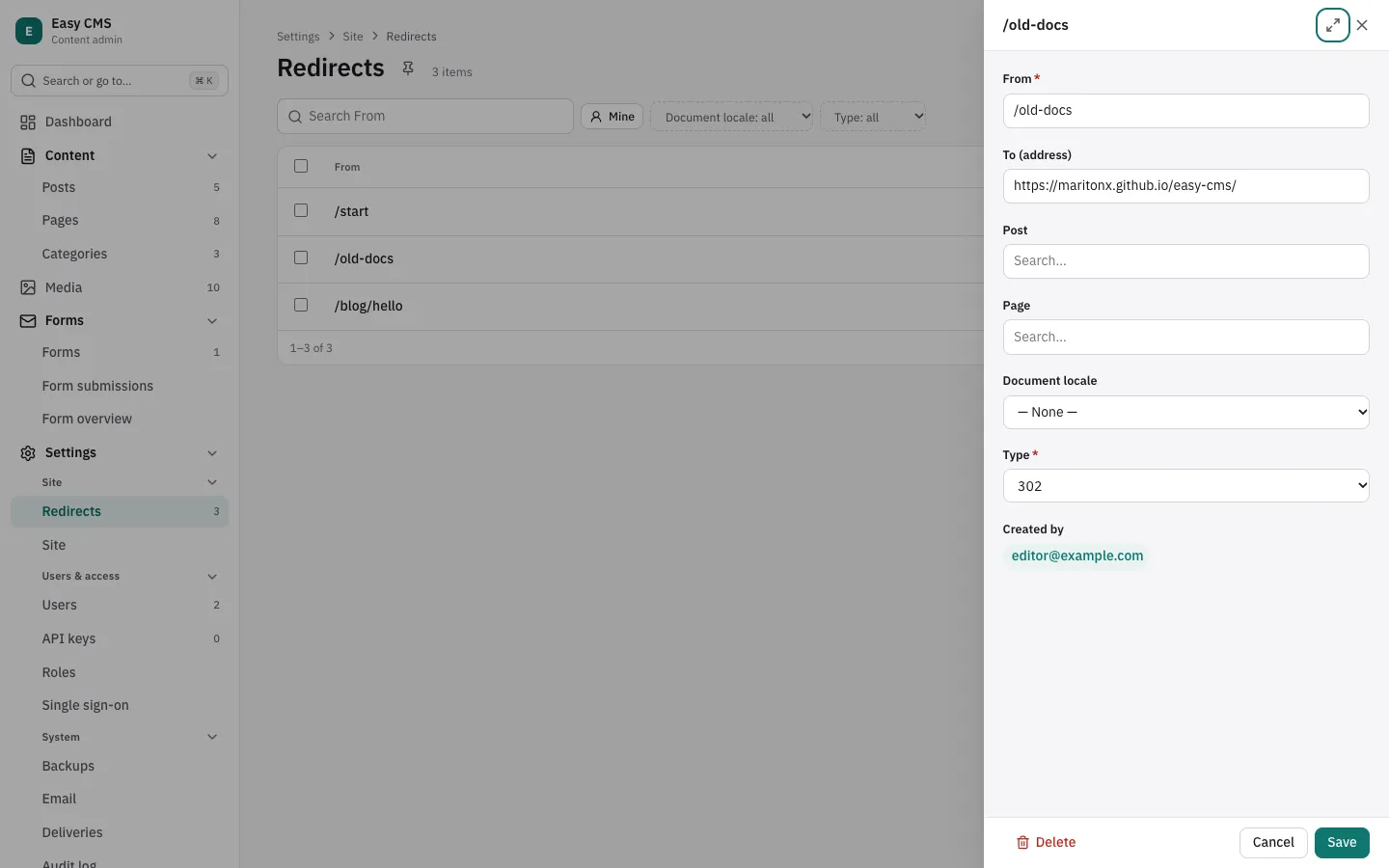
Old category, tag and date archive URLs aren't redirected. Add the ones that get traffic by hand in Settings → Redirects.
What comes across, and what doesn't
Comes across | Doesn't |
|---|---|
Titles, slugs, excerpts, dates | Tags and authors (add them the way categories are done) |
Paragraphs, headings, lists, quotes, code, links, bold, italic | Embeds (YouTube, tweets) and other |
Images in posts, featured images | Page builder layouts: the text arrives, the columns don't |
Categories | Custom fields (ACF), menus, comments |
Shortcodes, as the HTML WordPress renders for them | Unpublished content, unless you sign in with an application password |
Shortcodes need a second look. The REST API returns content after WordPress has run them, so a working [gallery] arrives as HTML. But if the plugin that owns a shortcode is gone, WordPress leaves the text alone, and you get a paragraph that literally says [gallery id="1"]. Before launch, run richTextToPlainText() from @easy-cms/richtext over the imported bodies and look for a leftover [.
Custom post types work the same way if they're exposed in the REST API (show_in_rest): add a collection and their REST name to the loop.
Launch day
Run it locally with
--limit 10and read the posts in/admin: headings, lists, images, the cover, the categories.Fix the mapping and run it again, as often as you need. Documents and images are updated, not copied, and existing redirects are kept.
Create a migration for the new collections (
npx easy-cms migrate:create wordpress). For production, runeasy-cms migratefirst, then the script with the production settings andNODE_ENV=production, so the schema isn't pushed into that database. On serverless hosts, make sure uploads go to S3, R2 or Vercel Blob, not to a local folder.Back up, run it one last time, switch DNS.
Two things follow from the design, and you should agree with them before you start. A re-run overwrites imported documents with what WordPress has, so editors keep writing in WordPress until the switch and don't edit imported posts in the new admin until then. And the script only creates and updates: a post deleted in WordPress stays in Easy CMS.
When to stay on WordPress
If the site is mostly WooCommerce, memberships, or dozens of ACF field groups that editors depend on, this script moves only the easy part. Moving the rest is a rebuild, not an import. Headless WordPress, or simply staying, may be the better call. A script like this fits blogs, company sites and documentation, where the content is posts, pages, categories and images, and the new site is a Nuxt or Next.js app.
The pattern works without Easy CMS, too. Give every imported record its source id with a unique constraint, upsert on it, make every side effect check before it acts, and compare URLs in one normalized form. Then the import is a command you can run every day until launch, not a one-off event.
Easy CMS is MIT-licensed: github.com/maritonx/easy-cms · docs. If you try it, tell me what got in your way in the feedback issue.