Mount a CMS in Hono, Astro or SvelteKit with one Web Request handler
A CMS that speaks (Request) => Promise<Response> fits any framework that hands you a Request. Hono, Astro and SvelteKit code, plus the HMR singleton.
Say your site is in Astro, or SvelteKit, or a small Hono server. You want editors to have a back office, and you want content in a database you own. Most CMSs give you two options. Use their framework, or run their server next to yours.
There is a third option, and it comes from a boring standard: the Fetch API's Request and Response. If a CMS is a function from Request to Promise<Response>, then mounting it is a routing problem. Every framework in this post hands you a Request.
This post mounts Easy CMS in Hono, then Astro, then SvelteKit, and reads content from each with the Local API. The first post in this series explained the architecture at a high level. This one is about the code.
A caveat before you copy anything. Easy CMS has packages for Nuxt and Next.js and a standalone server. Those three are tested end to end. Astro, SvelteKit and Hono are not. The docs say so plainly. Treat this as a recipe. The examples below were run against Easy CMS 1.4.1 with Hono 4.13, Astro 7.4 and SvelteKit 3.1 on Node 24, and that is all the testing they have had.
Three pieces
The Nuxt and Next.js packages are thin. Since ADR-0045, the Next.js package is built from these three pieces, and the Nuxt package uses the first two. You can use them directly:
From | What it does | |
|---|---|---|
|
| One instance per process, kept across hot reloads |
|
| The REST API on that instance, as |
|
| The prebuilt admin app, as |
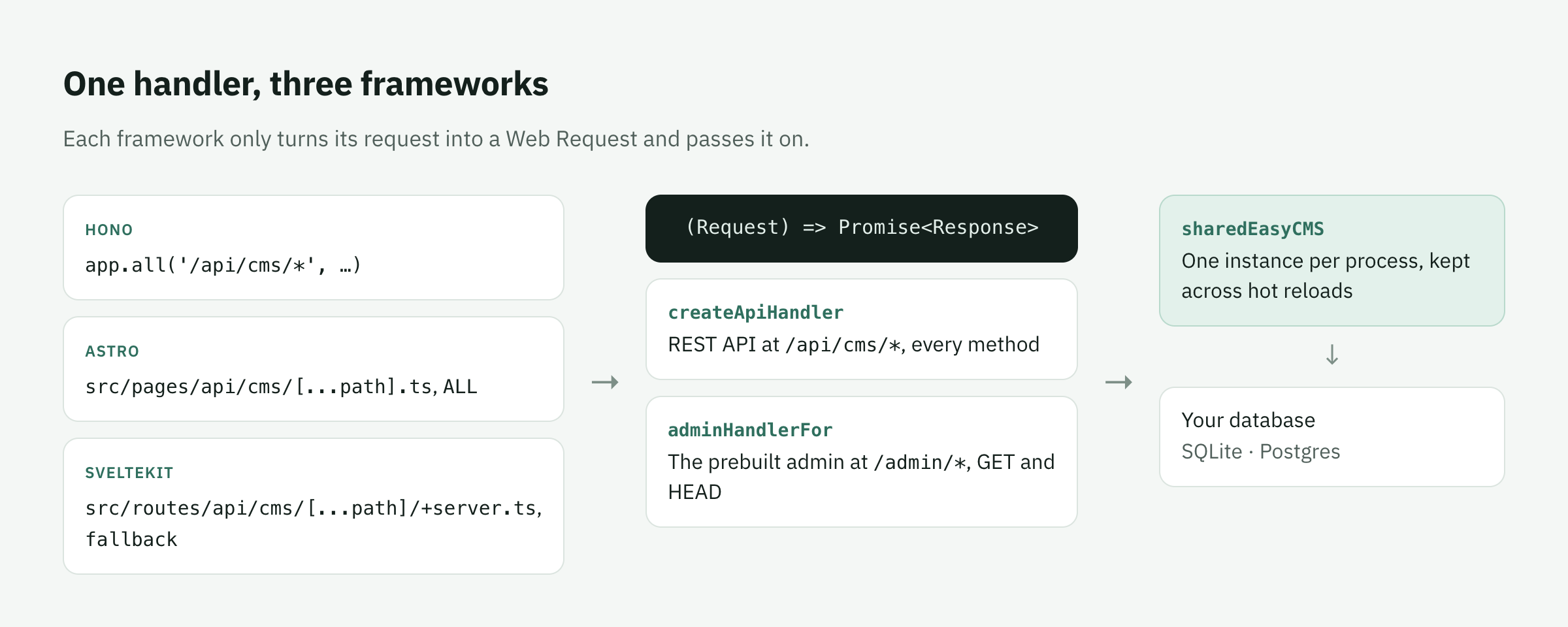
A fourth helper, cms.auth.userFromHeaders(headers), returns the signed-in user from a session cookie or a Bearer token. You use it to show drafts to editors.
Put them in one module that your routes import:
// cms.ts
import { adminHandlerFor } from '@easy-cms/admin'
import { createApiHandler, resolveConfig, sharedEasyCMS } from '@easy-cms/core'
import config from './easy-cms.config'

/** The Local API, typed from the config. */
export const getCMS = () => sharedEasyCMS(config)

/** The client's address for each request, filled in by the route before it calls `api`. */
export const clientIps = new WeakMap<Request, string | undefined>()

/** `/api/cms/*`, every method. */
export const api = createApiHandler(config, {
  getClientIp: (request) => clientIps.get(request),
})

/** `/admin/*`, GET and HEAD. */
export const admin = async (request: Request) =>
  adminHandlerFor(await resolveConfig(config), { siteURL: '/' })(request)
The clientIps map needs a word. A Web Request doesn't carry the client's IP address. The framework knows it, but it keeps it on its own context object. Easy CMS uses the IP for login rate limiting: the limit key is the email plus the IP. Without an IP, logins are limited per email only: every client trying the same email shares one bucket, so anyone can lock an editor out by failing on purpose. In production, Easy CMS logs a warning when it can't see the IP. The Nuxt adapter solves this with the same WeakMap trick, and so do the routes below. Behind a proxy you trust, you can pass trustProxy: true instead and Easy CMS reads X-Forwarded-For. On Vercel and Netlify it finds the IP without either.
The config is the same one from the first post: a posts collection with drafts: true, SQLite, and secret: process.env.EASY_CMS_SECRET!.
Install the core, a database adapter and the admin:
npm install @easy-cms/core @easy-cms/db-sqlite @easy-cms/adminHono: the simplest case
Hono's context has the raw Request at c.req.raw, and a Hono route can return a Response. That's all it takes:
// server.ts
import { serve } from '@hono/node-server'
import { getConnInfo } from '@hono/node-server/conninfo'
import { Hono } from 'hono'
import { html } from 'hono/html'
import { admin, api, clientIps, getCMS } from './cms'

const app = new Hono()

app.all('/api/cms/*', (c) => {
  clientIps.set(c.req.raw, getConnInfo(c).remote.address)
  return api(c.req.raw)
})
app.get('/admin/*', (c) => admin(c.req.raw))

app.get('/', async (c) => {
  const cms = await getCMS()
  // Signed-in editors (session cookie or Bearer token) also see drafts.
  const user = await cms.auth.userFromHeaders(c.req.raw.headers)
  const { docs } = await cms.find('posts', { sort: '-createdAt', limit: 10, draft: user !== null })
  return c.html(html`<ul>${docs.map((post) => html`<li>${post.title}</li>`)}</ul>`)
})

serve({ fetch: app.fetch, port: 3000 })
Run it with npx tsx watch --env-file=.env server.ts and open /admin. The admin redirects /admin to /admin/ (a 308), then asks you to create the first admin. The html tag escapes titles, which matters because editors type them.
One thing can look wrong at first: GET /api/cms/posts answers 401 for a visitor, while the home page lists the published post. That's by design. With no access rule, only logged-in users may use a collection over REST. The Local API trusts its caller and skips access rules unless you ask. If browsers should read posts over REST too, add access: { read: anyone } (import anyone from @easy-cms/core).
If you want a CMS-only server and not a site, there's a shorter path: createStandaloneHandler(cms) from the easy-cms package gives you the whole standalone server as one handler, /healthz included.
Astro: catch-all routes
Astro endpoints can export ALL, which takes every HTTP method. A rest parameter ([...path]) matches the base path and everything below it. You need a server adapter, since these routes run on each request:
// src/pages/api/cms/[...path].ts
import type { APIRoute } from 'astro'
import { api, clientIps } from '../../../lib/cms'

export const ALL: APIRoute = ({ request, clientAddress }) => {
  clientIps.set(request, clientAddress)
  return api(request)
}
// src/pages/admin/[...path].ts
import type { APIRoute } from 'astro'
import { admin } from '../../lib/cms'
export const ALL: APIRoute = ({ request }) => admin(request)The admin handler answers 405 for anything but GET and HEAD, so ALL is fine there too. Reading content happens in the page's frontmatter:
---
// src/pages/index.astro
import { getCMS } from '../lib/cms'

const cms = await getCMS()
const user = await cms.auth.userFromHeaders(Astro.request.headers)
const { docs } = await cms.find('posts', { sort: '-createdAt', limit: 10, draft: user !== null })
---
<ul>
  {docs.map((post) => <li>{post.title}</li>)}
</ul>
cms.ts moves to src/lib/cms.ts, with the config import changed to '../../easy-cms.config'. The example's astro.config.mjs sets output: 'server' and uses @astrojs/node.
Run astro dev as is and the config fails with secret: is required. Astro loads .env into import.meta.env, not into process.env, and the config reads process.env. Starting the dev server with Node's own flag fixes it: node --env-file=.env node_modules/astro/bin/astro.mjs dev. In production, set the variable in the server's environment.
SvelteKit: fallback and a trailing slash
SvelteKit's +server.ts can export fallback, which handles every method you didn't export by name. That includes GET:
// src/routes/api/cms/[...path]/+server.ts
import { api, clientIps } from '#lib/server/cms'
import type { RequestHandler } from './$types'

export const fallback: RequestHandler = ({ request, getClientAddress }) => {
  clientIps.set(request, getClientAddress())
  return api(request)
}
// src/routes/admin/[...path]/+server.ts
import { admin } from '#lib/server/cms'
import type { RequestHandler } from './$types'
export const GET: RequestHandler = ({ request }) => admin(request)Mounted like this, /admin loops. The admin redirects /admin to /admin/, and SvelteKit redirects /admin/ back to /admin. Next.js does the same, and the Next.js package turns the admin's redirect off. Do the same in src/lib/server/cms.ts:
// src/lib/server/cms.ts (the admin export)
export const admin = async (request: Request) =>
  adminHandlerFor(await resolveConfig(config), {
    siteURL: '/',
    // SvelteKit removes trailing slashes; redirecting back would loop.
    trailingSlashRedirect: false,
  })(request)
The admin still works at /admin because its HTML sets <base href="/admin/">. Content goes in a server load:
// src/routes/+page.server.ts
import { getCMS } from '#lib/server/cms'
import type { PageServerLoad } from './$types'

export const load: PageServerLoad = async ({ request }) => {
  const cms = await getCMS()
  const user = await cms.auth.userFromHeaders(request.headers)
  const { docs } = await cms.find('posts', { sort: '-createdAt', limit: 10, draft: user !== null })
  return { posts: docs.map(({ id, title, slug }) => ({ id, title, slug })) }
}
Two SvelteKit 3 details: the config lives in vite.config.ts as sveltekit({ adapter: adapter() }), and $lib is gone in favour of #lib, a Node subpath import declared in package.json ("imports": { "#lib/*": "./src/lib/*" }). On SvelteKit 2, use $lib and svelte.config.js. Start the dev server with node --env-file=.env node_modules/vite/bin/vite.js dev, for the same reason as Astro.
The HMR detail
Astro and SvelteKit run on Vite. When you save a file, Vite evaluates the changed module again, and every module that imports it, in the same Node process. If cms.ts held its instance in a module-level variable, each save would make a new instance with a new database connection, and the old one would never close.
So the instance doesn't live in the module. It lives on globalThis:
// packages/core/src/framework.ts (abridged, types removed)
const KEY = Symbol.for('easy-cms.shared')
const store = globalThis as unknown as { [KEY]?: Shared }

export function sharedEasyCMS(config, options) {
  const cached = store[KEY]
  const signature = configSignature(config)
  if (cached?.signature === signature) return cached.promise
  if (cached) void cached.promise.then((cms) => cms.destroy()).catch(() => {})
  const promise = createEasyCMS(config, options)
  store[KEY] = { signature, promise }
  promise.catch(() => {
    if (store[KEY]?.promise === promise) delete store[KEY]
  })
  return promise
}
The comparison is the interesting part. After a reload, the config is a new object even if nothing in it changed. Next.js makes this worse: it bundles the config into each server layer, so one process can hold several copies at once. Comparing by identity would rebuild the instance all the time. configSignature is a JSON string of the config with keys sorted and every function replaced by "fn". Same shape, same instance.
Before ADR-0045, the Next.js package compared configs this way and the Nuxt package compared by identity. Now both use sharedEasyCMS, and so does your Astro or SvelteKit app.
Here is what the SvelteKit example did, with a log line in cms.ts that printed the instance:
Edit | Instance |
|---|---|
Save | Modules evaluated again, same instance |
Add a | Old instance closed, new one, schema pushed (1 statement) |
Type an invalid field type | Error page; nothing cached |
Fix the typo | Next request starts a new instance |
createApiHandler follows along: it keeps one REST handler per instance in a WeakMap, so the API switches to the new instance on the next request.
Two trade-offs come with this. A change to a hook's code alone needs a restart, because functions only count as "fn". And there is one instance per process: if one app needs two configs, call createEasyCMS yourself.
What differs between the three
Hono | Astro | SvelteKit | |
|---|---|---|---|
API route |
|
|
|
Client IP |
|
|
|
| default | default |
|
|
|
|
|
Before production
Node.js 22.12 or newer. Easy CMS doesn't run in edge runtimes, so Cloudflare Workers and Vercel Edge are out.
Keep the admin package external. The admin's files are read from
@easy-cms/adminon disk. In test builds, both@astrojs/nodeand@sveltejs/adapter-nodeleft@easy-cms/*as imports and the admin loaded. If your build bundles it, mark it external or passappDirtoadminHandlerFor.Migrations. In development the schema follows the config. With
NODE_ENV=productionnothing changes by itself: create migrations withnpx easy-cms migrate:create, runnpx easy-cms migratewhere you deploy, and the server refuses to start while migrations are pending.
If you're on Nuxt or Next.js, use the packages: they are the tested path. If your frontend is a static site or a separate app, the standalone server may fit better than mounting anything. [TODO: your story — whether you've used this in a real Astro or SvelteKit project, 1 line]
If you try this in a framework that isn't here, I'd like to hear how it went, including where it broke.
Easy CMS is MIT-licensed: github.com/maritonx/easy-cms · docs. If you try it, tell me what got in your way in the feedback issue.